Wedding Guest Album or Disposable Camera App? Which Should You Choose?
Choose Wedding Studio for collection with optional timed reveal; choose POV when camera rules and the activity itself are the main purchase.
8 min read
Choose Wedding Studio for collection with optional timed reveal; choose POV when camera rules and the activity itself are the main purchase.
If you want guests to share the photographs already on their phones, I would choose a Wedding Studio guest album. A disposable camera app such as POV makes more sense when the camera game itself, including a chosen photo allowance and delayed reveal, is what you want to give people.
The most useful distinction is between collecting and directing. A guest album gathers pictures people choose to contribute. A disposable-style camera can shape how they take pictures during a particular activity. Both can be enjoyable, but I would not expect one to replace every part of the other.
Wedding Studio publishes this comparison. I reviewed our product evidence and POV's current primary page; I have not run a hands-on wedding camera test.
I would choose Wedding Studio when the surprise is the part of disposable cameras you want to keep. Its timed reveal hides uploads until the chosen moment, while the wider album accepts guest photos, videos and voice messages. Automatic categories and duplicate detection help you work through the photographs after the reveal. A fixed shot budget or particular film effect is a separate feature to compare.
If the camera-game route appeals, the disposable-camera app comparison covers named products. If the guest album is the priority, start with the wedding photo-sharing shortlist.
A shared guest album is the practical choice when you want the collection to include getting-ready pictures, travel moments, table photographs and clips sent after the reception. The invitation is to bring your photographs together, whatever camera was used to take them.
A disposable camera app is an activity. It can give guests a limited set of shots, a consistent style or a reveal time. Those constraints can be part of the appeal, especially when you want an interactive element during drinks or dinner.
Wedding Studio includes a disposable camera reveal mode in the album workflow. It keeps uploads hidden until a reveal time you choose. I would use it when the surprise matters but you still want the broader album collection. I would choose a dedicated camera product when the capture rules themselves matter.
| Decision | Wedding Studio guest album | Dedicated camera app such as POV |
|---|---|---|
| Main purpose | Collect contributed photos, videos and voice messages | Give guests a disposable-style camera experience |
| Existing pictures | Browser upload route for selected guest media | Check the chosen product's current camera-roll import rules |
| Surprise | Reveal mode hides uploads until the time you choose | POV advertises configurable reveal timing |
| Capture rules | No dedicated shot-budget claim made here | POV advertises a choice of photos per person and camera style |
| Guest entry | QR/link in a browser without guest account or app installation | POV advertises QR entry with App Clips/Instant Apps and no required app download for guests |
| Afterward | Album downloads and optional paid photobook | Confirm original download, access and any print-product terms for the chosen event |
POV presents a disposable-style camera with configurable photos per person, style and reveal timing. Choose it when those capture rules are part of the activity you want.
I would start with Wedding Studio when the photographs matter more than imposing a camera rule. Guests use the QR code or link to open the album in their browser, select pictures or clips and contribute without creating an account.
That fits a wedding because people take photographs at different times and in different ways. A guest may have a family portrait from before the ceremony, a clip from the evening and a photograph taken by someone else with permission to share. A collection route gives them a place to bring that selection.
The wedding photo sharing album is the starting point. Choose the guest-facing title and image so people recognize the destination, then decide whether the collection should be shared immediately or remain hidden for the reveal.
Wedding Studio's reveal mode hides guest uploads until the chosen reveal time. I like that for a couple who wants the anticipation of seeing the collection together afterward. The surprise comes from visibility, while the collection remains an album.
A reveal setting should not be described as a physical disposable camera or a verified limited-shot camera. Those are different mechanisms. If you want every guest to have a defined shot budget or a particular capture interface, compare a dedicated app on that requirement.
Choose a reveal time that suits how you will use the album. A morning-after reveal can give people something to open after the reception. A later reveal may let the couple look through the collection before discussing it with the group. Check the actual privacy settings so the invitation accurately describes who will see what.
Tell guests what to expect. Someone who uploads and sees no pictures may think the contribution failed unless the delayed reveal is clear. A short note can explain that the album opens later without making the card a technical manual.
If you use reveal mode, I would still ask people to upload the pictures they took during the day. Avoid wording that implies they must use a new camera interface if the purpose is collection.
The QR photo collection guide explains where to start. Create the album, confirm the guest route and then produce the card or sign. The code should lead to the intended collection rather than a general marketing page.
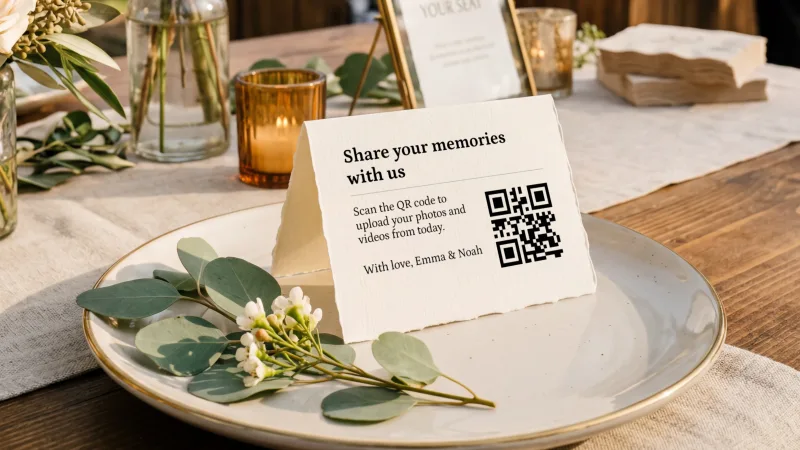
A readable fallback link is useful if a phone cannot scan. I would also send the link after the wedding, because some of the photographs you want will still be sitting on phones while guests travel home.
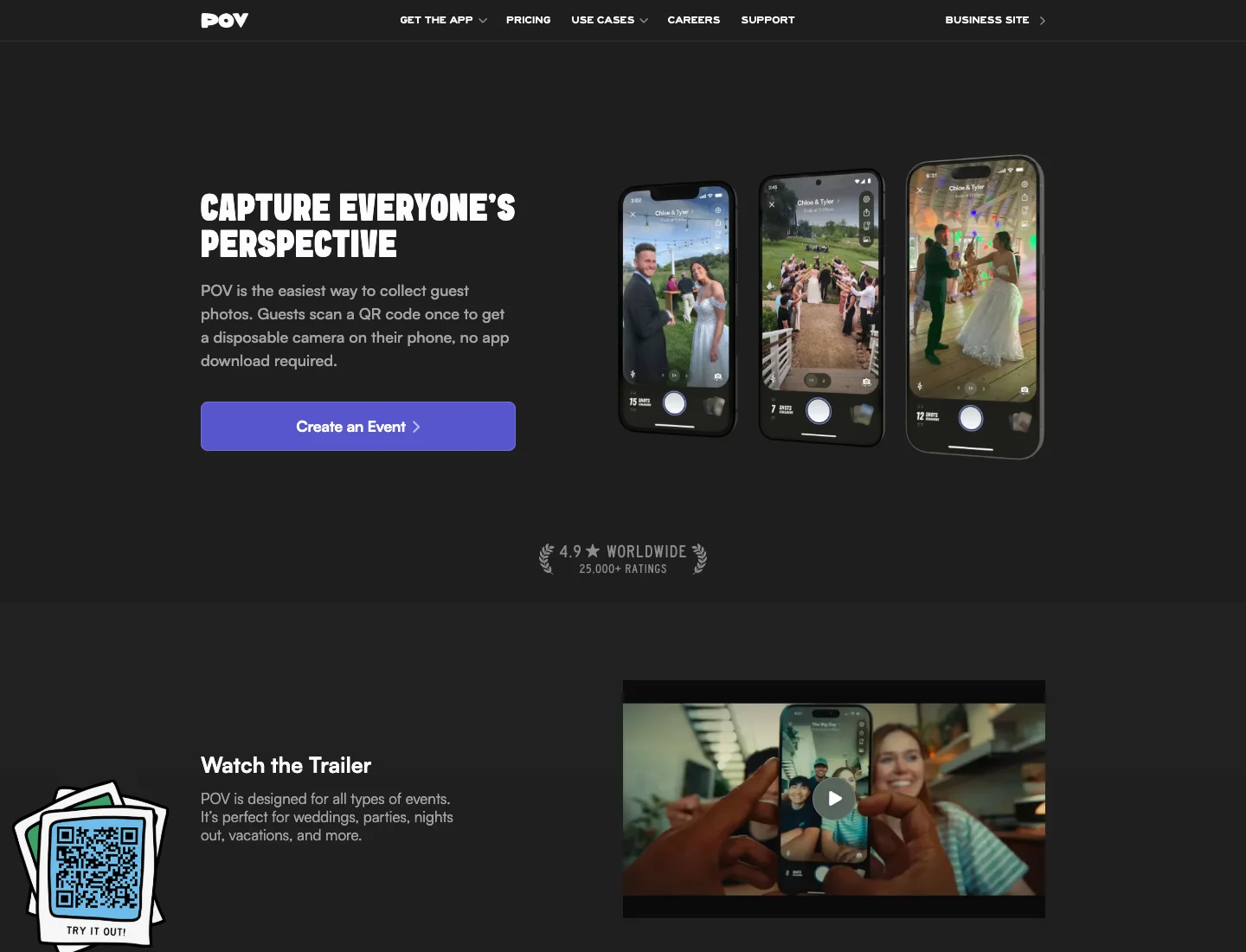
POV's product page describes guests scanning a QR code to get a disposable-style camera on their phone. It also presents a choice of style, photos per person and reveal timing. I would shortlist it when those controls are part of the wedding activity you have imagined.
A chosen photo allowance can change what guests pay attention to. Instead of sending everything later, they may think about which moments deserve one of their shots. That is an editorial possibility, not a guarantee about how your guests will behave.
Check the host and guest routes separately. An app used to create or manage the event is not necessarily an app every guest must install. POV advertises App Clips and Instant Apps for guest entry, so I would not use the blanket claim that a disposable camera app always requires an app download.
For your actual guest list, check a supported iPhone and Android route before making the activity central. Ask what happens if the guest opens the link inside a messaging app, returns later or changes devices. A homepage promise is a starting point for the choice, while a small rehearsal resolves the event-specific questions.
I would also ask about camera-roll imports and original downloads if those matter to you. A product designed around taking new pictures may have a different relationship with existing files from an album built around contribution. Do not assume parity in either direction.
A physical disposable film camera gives guests an object to pass around. It introduces film, development, scanning and collection responsibilities that a phone-based product does not share.
If the physical object is important to the table design or the experience, an app is not an exact substitute. I would price the cameras and processing together, decide who gathers them and accept that the outcome has different uncertainties from a phone gallery.
A film camera also does not collect the pictures guests took on their own phones. You can offer a QR album alongside it if you want those contributions. Give each route a clear purpose so guests understand why both are present.
The useful comparison is the total activity, including the later work. A low camera price can be misleading if processing and scanning are left outside the budget. A digital product can also have plan and download terms that need checking before purchase.
I would choose a single primary invitation. For an album, the task is "add the photos and videos you took." For a camera game, the task is "join this camera and use your shots." Those instructions are short because the method has been chosen already.
Using both can work if the roles are clear. The camera game might run during the reception, while the main album receives travel photographs and later uploads. Explain the distinction rather than placing two unexplained codes together on the same card.
Think about the quieter guests too. People prefer sharing an existing photograph to opening a camera in front of others. Others enjoy the prompt of an activity. Making the wider contribution route available can avoid excluding a useful picture because someone did not join the game at the expected moment.
A helper can show people the route without turning participation into a duty. I would make the invitation easy to find and repeat it once in a follow-up rather than ask guests to keep checking whether they have done enough.
Wedding Studio plans are one-time purchases, with Starter at $29 USD, Pro at $69 USD and Unlimited at $99 USD. Guest capacity differs by plan, while printed cards and photobooks are paid extras.
Album access lasts 24 months after the wedding. Save the photographs, videos and voice files before that period ends. A reveal time controls when you see contributions; it does not extend the hosting period by implication.
For a dedicated camera app, check the current qualifying event plan, guest allowance, any shot settings, download rights and access dates together. A low entry price is less helpful if the wedding requires an upgrade you did not include.
If a printed keepsake matters, compare the actual product rather than the word photobook. Wedding Studio's guest-photobook route uses the album collection. Other services may have a different design, approval or surprise-book process. Choose the one that matches the control you want.
For a guest album, the sample task is contributing a photograph that already exists on the phone. For a camera app, it is joining the event, taking a picture and understanding what happens before reveal. I would rehearse the relevant task rather than treat opening the homepage as proof that the activity is ready.
Use the printed or messaged invitation as written. If the helper must explain something that is absent from the card, decide whether to change the wording or simplify the activity. The QR placement guide helps with the physical route into either method.
When the card will be printed at home, prepare a sample through the QR template guide and check the final destination. A stylish camera activity still depends on guests reaching the right event.
Give the helper a fallback link and a clear explanation of the reveal. That is enough for many ordinary questions without putting the whole responsibility on the couple during the reception.
I would choose Wedding Studio when I want a generous view of what guests photographed across the wedding, with reveal mode available for a shared surprise. It is the stronger fit for collecting pictures people already have, clips and voice messages around one destination.
I would choose a dedicated camera product such as POV when the activity of taking a chosen set of photographs is the purchase. Confirm the supported guest route and the final download before printing the invitation, and keep a main album link available if you also want the wider collection.
Invite guests to add photos and videos to your album without installing an app. Choose optional printed cards and save your downloads before album access ends.